
uncompressed.io vs Frame.io: an honest comparison
Your film. Your client review. Your export.
Frame.io organizes production at scale. uncompressed.io brings your hosted film, client notes and delivery around your export. Start with what your client will see, then compare the tools your team depends on.
Compare team cost and storage together
Monthly USD list prices before tax, checked September 15, 2026. These are different configurations, not equivalent storage packages.
| Members | Frame.io Pro | Frame.io Team | UC |
|---|---|---|---|
| 1 | $15 · 2 TB | $25 · 3 TB | $39 · Pro |
| 2 | $30 · 4 TB | $50 · 5 TB | $54 · Pro + 1 seat |
| 5 | $75 · 10 TB | $125 · 11 TB | $219 · Studio |
UC Pro includes 250 GB hot and 750 GB cold; Studio includes 1 TB hot and 8 TB cold. Archive must be restored before viewing. Frame.io can cost less for a team whose main need is production storage.
Keep Frame.io when Camera to Cloud, your Adobe entitlements or established production workflows are essential. Test UC when you also want a portfolio, original-export playback and final delivery in the same library. Check any Frame.io access already included with your Adobe subscription before buying another plan.
What happens to the file.
Frame.io
Frame.io generates playback proxies for different devices and connections. Its July 23, 2026 documentation lists a 14 Mbps average maximum for the 4K proxy. Original files remain available for download.
uncompressed.io
We serve the uploaded export without another encoding pass. You choose the file presented; playback depends on the recipient’s codec support, hardware and connection.
Bitrate is not a quality score. Compare the same shot on your client’s device. A larger file may need more buffering.
Head-to-head, from their published pages.
Same paid team size. Monthly billing. Tax excluded. Totals include the seats you pay for; storage and features differ and are listed separately. Annual discounts are not used here.

A file-size limit is not an account’s storage allowance. A 5 TB file requires that much available storage on either platform. On uncompressed.io, direct uploads are capped at 5 TB per file; the free account still has only 5 GB total. Vimeo imports and archive transfers have smaller limits. Cold archive must be restored before playback.
New uncompressed.io storage blocks bill monthly only: $50/TB ready to play and $25/TB cold, even with an annual base plan. They are not included in the examples above.
Uncompressed prices are USD; Frame.io prices use $ as published. V4 sources checked September 7, 2026: Pricing · Members and storage · File-size limit · 4K playback · Video and audio proxies · Resolve comment import. All uncompressed.io plans.
The shot. The note. The reply.
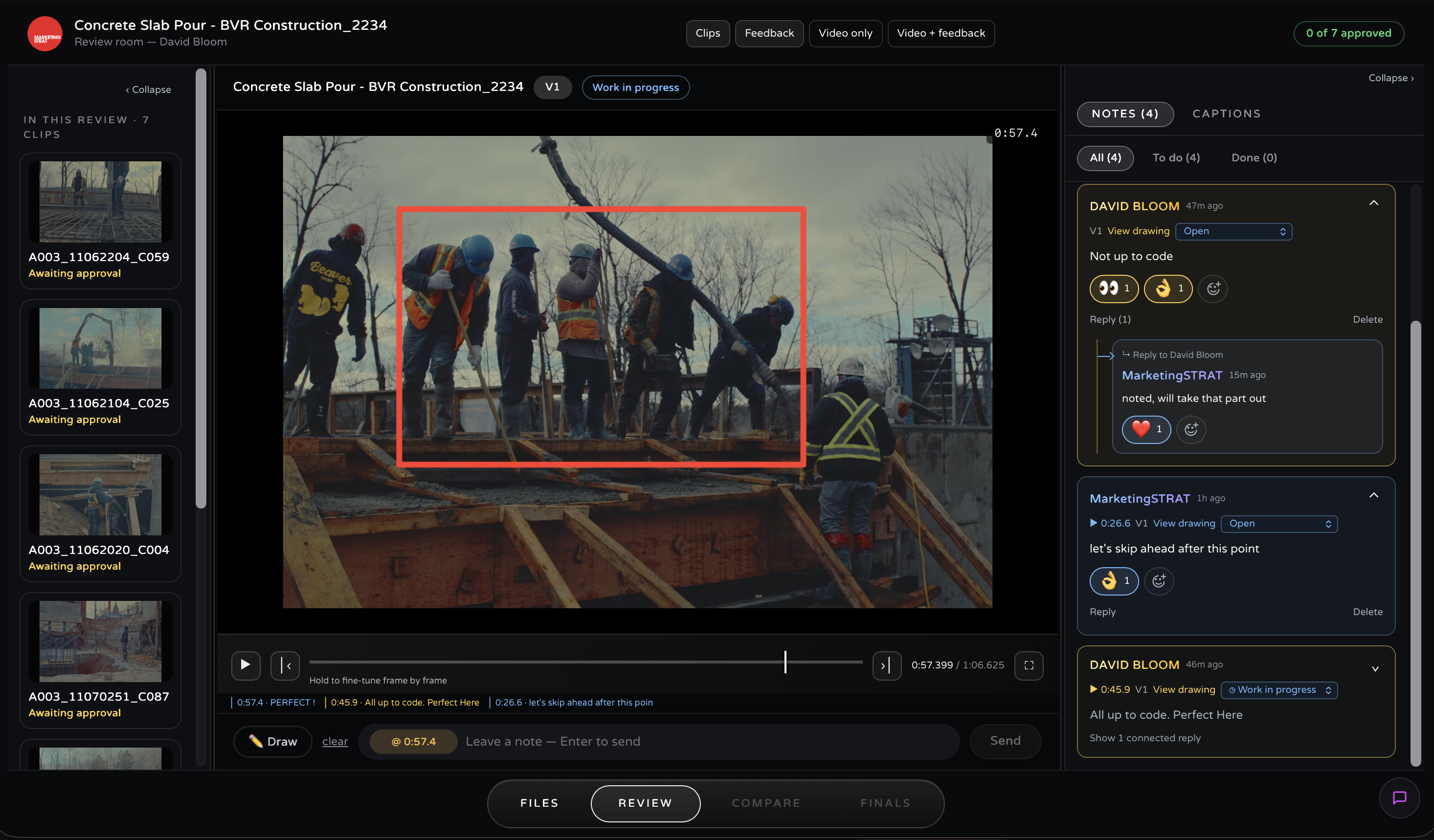
Everything below is shipped and in the product today
A full review room. On the master.
Share a clip or a whole collection with a client’s email and they get a white-label invitation page carrying your brand: no account to create, nothing to install, no seat to buy.
Timecoded comments
Timecoded comments stay attached to the relevant moment. Opening it seeks the player straight there: no more “around 2:14”.
Drawings on the frame
Your client draws directly on the image. The annotation is stored with the comment and visible on both sides.
Threads, reactions, done
Threaded replies, reactions, and a done check per comment, so a round of notes actually closes.
Versions on one card
Upload V2, V3… against the same card. Compare any two versions side by side or with a wipe, at full quality.
Aspect ratios as themselves
16:9, 9:16 and 1:1 each carry their own version stack. The social crop is reviewed as itself, not as an afterthought.
Per-version approvals
The client approves a specific version, or requests changes on it, and the sign-off is recorded against that version. Awaiting approval, work in progress and approved show the next action.
Revision rounds
Set the rounds a project includes and what an extra one costs. The client sees the warning before they go over.
Deliverables, same room
Drop the final masters in the deliverables drawer and the client downloads them from the room the review happened in: original files, full fidelity.
AI captions ride along
AI transcription generates captions for supported clips within your plan’s allowance: edit them, style them, export .srt or .vtt. Your client can even search the dialogue and jump to the frame where a line is said.
Choose for your team.
Frame.io
Paid plans add members and storage together. Pro includes 2 TB, Team 3 TB, then 2 TB per added member. Check the integrations, permissions and Enterprise terms your production needs.
See official pricinguncompressed.io Pro
$39 / month
250 GB ready to play plus 750 GB cold archive, one team seat and unlimited external client reviewers. Review tools included. Additional seats cost $15/month and do not add storage.
uncompressed.io Studio
$219 / month
Five team seats, 1 TB ready-to-play storage and 8 TB cold archive. Vault access is already included across plans; Studio adds capacity and seats.
Uncompressed prices shown are monthly USD. Annual billing and add-ons are detailed with all plans. Offers have different capacity and capabilities; this is not a like-for-like price calculation.
The questions switchers ask.
Is uncompressed.io a Frame.io alternative?+
For client cut review and delivery, it is an alternative worth testing. Comments, drawings, versions and approvals live beside your hosted film. Frame.io has a broader production collaboration system, including metadata and Camera to Cloud. Compare the workflows your team actually uses.
How does the pricing compare?+
Both offer a free tier. Frame.io’s paid plans charge per member and add storage with members. Uncompressed plans include different amounts of storage and team seats; extra seats cost $15/month on paid plans. External client reviewers are not billed as team seats. Compare total storage, collaborators and billing periods, not one headline price.
Do clients need an account or a seat to review?+
For ordinary browser review, no. Compatible exports open from the review link, and clients can comment and approve without a paid team seat. Vault review is a separate authorized macOS workflow.
What about protected footage?+
Frame.io offers Enterprise Prime DRM in supported web and native clients. The uncompressed.io Vault uses a compatible macOS app for protected review. Its capture restrictions and watermarking have specific requirements; no system prevents filming a screen, and watermark recovery is not guaranteed.
Can clients review camera originals?+
The uncompressed.io macOS app supports R3D, BRAW, N-RAW and ProRes on compatible Macs. Codec, hardware and file availability determine playback. For browser review, use a supported export and test it on the recipient’s device.
Your client’s next note should land on your film.
Upload a master, share it by email, and run the first review round today, at the bitrate it left the suite.