
Client review
Less back-and-forth.
From first note to final delivery.
Timecoded, threaded comments and frame drawings. Versions and approvals in one place. Final delivery in the same room. Your clients open one link, without an account or a paid seat.
Video hosting for filmmakers · 5 GB free · Paid plans from USD 9/month
By uncompressed.io · Updated 15 September 2026
The client's first visit
Open the link. Find the version. Leave the note.
For ordinary browser review, clients do not need a UC account or a paid seat. They need your review link, any password you set, and a browser that can play the file.
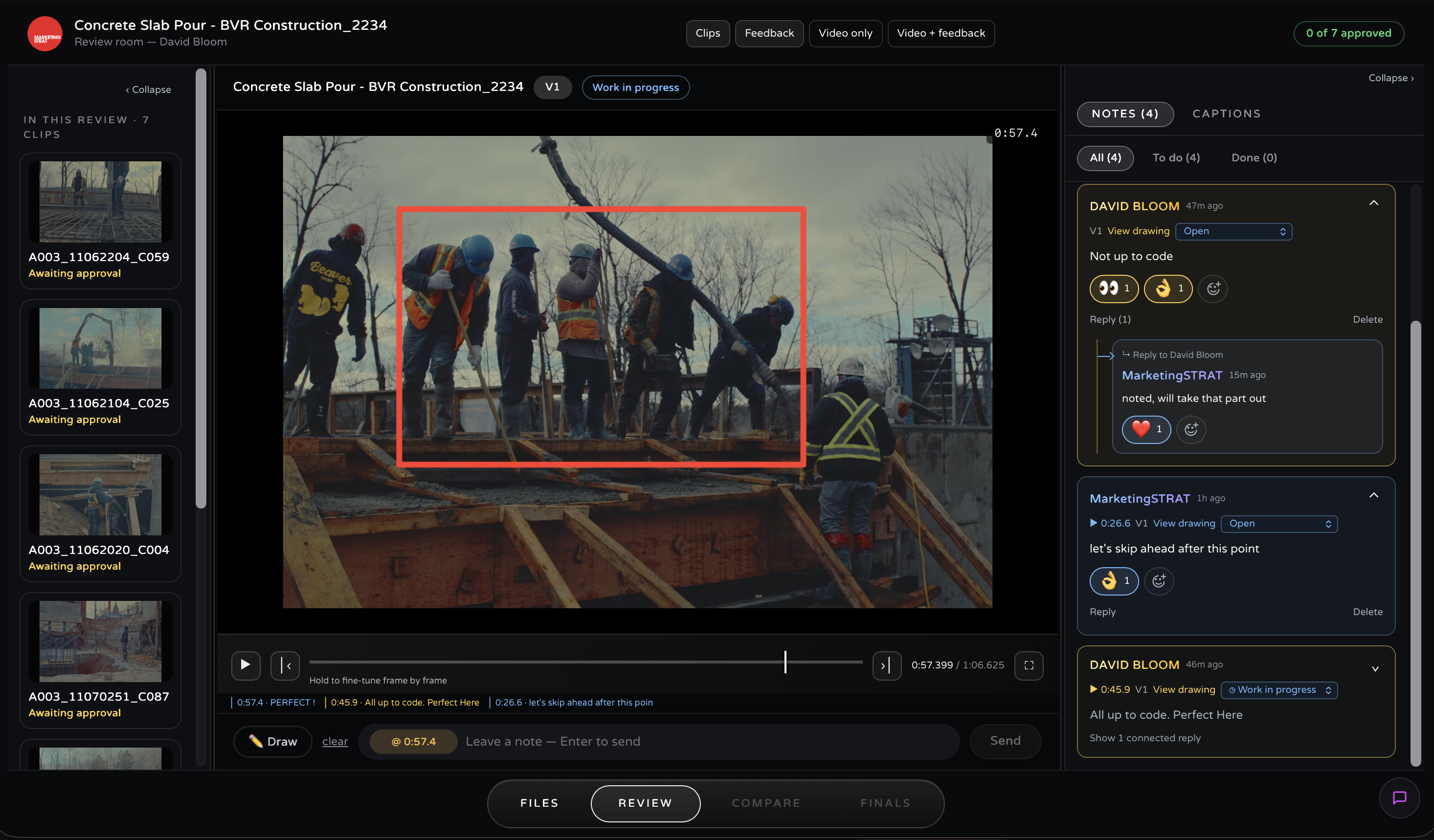
Confirm the version and aspect ratio
Make sure the client is reviewing the intended cut, rather than yesterday's export or a different social crop.
Pause, comment and explain the drawing
Leave one request per note. Reply within the thread when clarifying the same change.
Make the decision explicit
Request changes or approve the specific version. Use deliverables for the final files once the creator has made them available.
Download instructions to send with a review link. Before inviting a real client, open your own link signed out and verify viewing, commenting and download permissions. Vault uses a separate authorized app workflow.
How it works
From export to sign-off.
The link is the access.
Give your client one place to watch the cut, point to a change and approve the next version. Notes stay with the footage. Finals stay with the project. You spend less time matching an email to a shot and more time finishing the film.
Upload the master
Drop in an export up to 5 TB. Use a browser-compatible file and check playback before sending the review link.
Share one link
The link is the client's access. They open it in a browser that supports the uploaded codec, with no account to create and nothing to install.
Collect precise notes
Timecoded comments seek the player to the relevant moment. Clients draw on the image; the annotation stays with the comment.
Approve and deliver
Awaiting approval, work in progress and approved show whose action comes next. Sign-off belongs to a version; uploaded finals are delivered from the same room.
The room carries your accent and logo, never our branding, on every plan. Replies thread under each note, and a done check per comment closes the round. With AI captions on, a client can search the dialogue and jump straight to the frame where a line is said.
Set passwords, expiry and download permissions for browser review. For sensitive work, the Vault uses a separate macOS review path with additional controls, documented on the security page.
The difference
The review runs on your master.
Preserve the export you are reviewing.
You chose the grain, the shadows and the finish. Keep that export at the centre of review. Frame.io and Vimeo generate playback renditions; uncompressed.io serves the uploaded file without a second encoding pass.
We serve the file you upload without another re-encode. Browser playback depends on the codec, profile, bit depth, device and connection. H.264 is a practical starting point for broad compatibility; test HEVC or AV1 with the recipient before an important review.
The macOS app supports R3D, BRAW, N-RAW and ProRes on compatible Macs. Playback depends on the codec, hardware, storage and file availability; test a short clip on the recipient’s Mac. For browser review, use a supported H.264, HEVC or AV1 export.
The honest trade
Head to head
Frame.io, side by side.
Their published numbers against ours.
Choose for the review you need. Frame.io has extensive production collaboration and generous included storage. uncompressed.io combines your video library, export playback and client review, with storage and team seats set by plan.
Same paid team size. Monthly billing. Tax excluded. Totals include the seats you pay for; storage and features differ and are listed separately. Annual discounts are not used here.

A file-size limit is not an account’s storage allowance. A 5 TB file requires that much available storage on either platform. On uncompressed.io, direct uploads are capped at 5 TB per file; the free account still has only 5 GB total. Vimeo imports and archive transfers have smaller limits. Cold archive must be restored before playback.
New uncompressed.io storage blocks bill monthly only: $50/TB ready to play and $25/TB cold, even with an annual base plan. They are not included in the examples above.
Uncompressed prices are USD; Frame.io prices use $ as published. V4 sources checked September 7, 2026: Pricing · Members and storage · File-size limit · 4K playback · Video and audio proxies · Resolve comment import. All uncompressed.io plans.
NLE round-trip
Notes land in your timeline.
Resolve, Premiere, Final Cut.
Collecting notes in a browser only pays off if they reach the edit. Three round-trips ship today, and all three are free downloads.
DaVinci Resolve
A script brings review comments into your timeline as markers, with the note text attached. Work through feedback alongside the cut.
Premiere Pro
A signed panel brings comments in as sequence markers, so you clear notes inside the edit instead of alt-tabbing between a browser and the timeline.
Final Cut Pro
One drag of a .fcpxmld bundle imports the markers plus drawing stills, ready to step through against the cut.
Install steps for all three live on the NLE sync page. If your client work sits on Frame.io today and you cut in Resolve, the Resolve guide covers comment transfer and the setup to check before switching.
Versions and delivery
Built for the revision cycle.
One card, one link, every version.
A review tool earns its place between V1 and final delivery. The room tracks the whole cycle without the link ever changing.
Versions and aspects
V2 and V3 stack on the same card, and new versions keep the same link. 16:9, 9:16 and 1:1 each carry their own version stack, so the social crop gets reviewed as its own cut.
Approval, per version
Approval or a change request is recorded against the specific version, not lost in a thread. Both sides can always see whose move it is.
Deliverables, same room
Finals ship from a deliverables drawer under the same access rules: original files, full fidelity, downloads switched on by you.
Plans
Every plan has the whole room.
No per-view charges; plans vary by storage and team seats.
Review, approvals, deliverables and NLE sync are included across tiers. Choose the storage and team seats you need; caption-generation allowances also vary by plan. External client reviewers do not require paid team seats.
5 GB
Free plan
One film at a time, core hosting and review tools, no credit card
$9
Paid plans from
Lite: 100 GB hot storage, per month
5 TB
Per master upload
Check file size before upload
Unlimited
Viewers and streams
No per-view charge; team seats are separate
Questions
Frequently asked
Do clients need an account to review a video?
No. The share link is the client's access: they open it in a compatible browser, comment, approve, and download deliverables with nothing to install and nothing to sign up for. Passwords, unlisted links and expiring access are set per video on your side.
Is this a Frame.io alternative for client review?
For client cut review, uncompressed.io brings comments, drawings, versions, approvals and final delivery into your video library. Frame.io offers a broader production collaboration system and creates playback proxies. Here, browser-compatible exports play without another platform re-encode. Compare your team, storage and integration requirements as well as the picture.
Do comments carry timecode, and can clients draw on the frame?
Both. Timecoded comments stay attached to the moment they refer to, and opening it seeks the player straight there. Reviewers draw directly on the image, and the annotation is stored with the comment, visible to both sides.
What quality does my client actually watch during review?
The macOS app supports R3D, BRAW, N-RAW and ProRes on compatible Macs. Playback depends on the codec, hardware, storage and file availability; test a short clip on the recipient’s Mac. For browser review, use a supported H.264, HEVC or AV1 export.
Can I pull the notes into DaVinci Resolve, Premiere Pro or Final Cut?
Yes, all three, as free downloads. A Resolve script and a signed Premiere panel pull comments in as timeline markers, and Final Cut Pro takes a one-drag .fcpxmld bundle with markers plus drawing stills.
Run your next review on the master
Upload a cut, share the link and collect timecoded notes on your export. Review tools are included on every plan. Start with one film, 5 GB and no credit card.
Sources
- 1.Frame.io Pricing (plan prices, member counts, storage and free-tier limits, read September 2026)
- 2.Player page features, Frame.io V4 Knowledge Center (4K playback available on Pro plans and higher)
- 3.What are my assets converted to when it's uploaded?, Frame.io Support (H.264/H.265 playback proxies; current article updated July 23, 2026)
- 4.What to expect when updating to V4, Frame.io V4 Knowledge Center (current V4 integration changes and migration guidance)
- 5.Uploading your media, Frame.io V4 Knowledge Center (single assets up to 5 TB)
- 6.Guidelines for determining playback resolution, Vimeo Help Center (playback rendition settings and conditions)